How to Make Sure You Get Brite Lotus Emails
If my email isn't in your inbox, it's probably in one of four places. Here's how to find it, and how to make sure the next one arrives where you expect.
Welcome!
If you just signed up, there is an email from me on its way to you.
Sometimes it does not land in your inbox. You aren't doing anything wrong. Email providers make their own decisions about where a message from a new sender belongs, and they do not always get it right.
Here is where to look, and how to make sure the next one arrives where you want and expect it.
Gmail
- Check the Promotions tab at the top of your inbox (if you see it there). A message from a new sender often lands there.
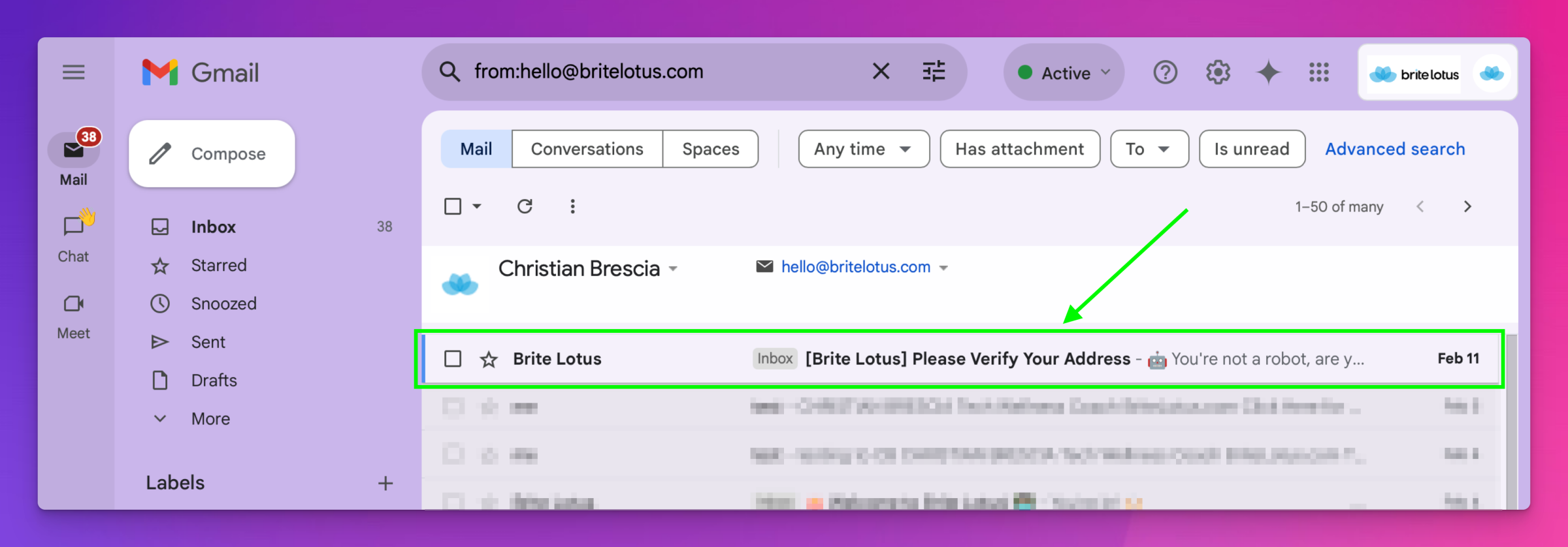
- Still not seeing it? Type britelotus.com or hello@britelotus.com into the search bar at the top.
- If you find it outside your Primary inbox, click and drag it to Primary Tab — or open it, click the three dots (upper-right), and choose Move to, then Primary.
- If it is in Spam, open it and click Not spam.
- Finally, open the email, hover over my name at the top, and choose Add to contacts.
Yahoo! Mail
- Check your inbox, then look in your Spam folder.
- Or search for Brite Lotus from the search bar.
- If it is in Spam, open it and choose Not Spam. Yahoo will move it back to your inbox for you.
- Open the email, click my name, and choose Add to contacts.
Apple Mail on Mac
- Check your inbox, then look in Junk.
- Or use the search box at the top right and search for Brite Lotus.
- If you find it in Junk, open it and click Not Junk at the top of the message, then drag it back to your inbox.
- Click my name in the header of the open message and choose Add to Contacts.
Outlook
- Check Junk Email.
- If your inbox is split into Focused and Other, have a look under Other as well.
- Or search for Brite Lotus using the search bar.
- If you find it in Junk, open it, choose Not junk, and move it to your inbox.
- Right-click my name and choose Add to Outlook Contacts.
On iPhone or iPad
The apps look a little different on a phone, but you are doing the same four things in every one of them:
- Find the email — search for Brite Lotus, or check Spam or Junk
- Tell the app it is not junk
- Move it to your inbox
- Add me to your contacts
In almost every mail app, tapping the sender's name at the top of an open email is the quickest way to all of this. That is where Add to Contacts lives, whether you use Gmail, Yahoo Mail, Outlook, or Apple's own Mail app.
That is it. A minute now saves you from wondering later.
If this was useful, there is plenty more at britelotus.com.